

Grafiti SigmaStat 4.0 Academic for Students & Faculty
Eligibility: Students & Faculty Only
SigmaStat is an easy-to-use, wizard-based statistical software package designed to guide users through every step of the analysis and perform powerful statistical analysis without being a statistical expert. SigmaStat is tailored to the areas of life science and medical research, but can be a valuable product to scientists in many fields.
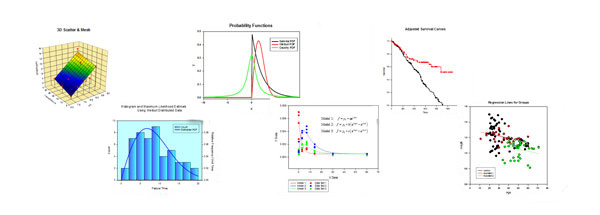
SigmaStat Helps You Analyze Data Confidently, Visualize Results Easily. With SigmaStat, you can be confident that you have analyzed your data correctly. And you save time, too!
SigmaStat provides a wide range of powerful yet easy-to-use statistical analyses specifically designed to meet the needs of research scientists and engineers.
With the features in the program, you are guided through the process of choosing the appropriate test to analyze your data, running the test, and interpreting the results in the test report.
For many tests, graphs are available to summarize the test results.
The editing features in the program allow you to customize the appearance of reports and graphs. Your final results may be distributed using the large variety of file formats available for export.
Analysis Features

Regression Wizard:
- Solve a nonlinear regression problem with one of our 150 built-in fit equations or with a user-defined fit equation
- Raw data for the regression can be selected from the worksheet using a variety of data formats or can be selected from a plot in a graph
- The program’s default fit library contains models based on polynomials, rational functions, exponential growth and decay, sigmoidal functions, ligand binding, waveforms, logarithmic functions, probability distribution and density functions, piecewise linear and others
- User-defined equations are created from the Regression Wizard using the Edit Function dialog and are saved to our default fit library. They can optionally be saved to any notebook file. An equation item in a notebook will launch the Regression Wizard when double-clicked
- Fit model equations are coded with the Transform Language and can contain definitions of constants, weight variables, linear equality and inequality constraints and other variables
- Initial parameter values required by the algorithm can be specified as constants or be defined using our automatic parameter estimation functions in the Transform Language
- Fit equations can contain up to 500 parameters and up to 50 independent variables
- Weighted regression is supported with weights defined as a constant per observation or as functions of the regression parameters. Weight functions permit the user to apply robust procedures for parameter estimation that mitigate the effects of outliers. Examples are given in the program’s fit library and the installed sample files
- Options are available to create many types of results shown in the regression report or the worksheet.
- Graphs of the best-fit equation with the raw data can be created for models with two or three independent variables. Confidence bands can be added
- Models can be created to solve other type of problems besides ordinary data fitting. Examples are contained in the sample files and include global curve fitting, solving systems of equations, quantile regression and distribution fitting
Histogram Wizard:
- Produce a frequency histogram of a worksheet column
- Select from multiple graph output styles
Plot Equation Dialog:
- Create the graph of a function in two or three dimensions
- Enter a user-defined function or select an equation item from an equation library
- Evaluate functions for specific values of the independent variable(s) or solve equations to obtain values for the independent variable for specified values of the dependent variable. Copy the results to paste to the worksheet, report or graph page
Transforms:
- Write your own numerical procedures, called Transforms, in the User-Defined Transform dialog. The Transform Language provides a vector-based computational environment with operations and functions that can manipulate worksheet data and perform many computations important to data analysis
- Transforms can be saved as items in a notebook file or as separate files with the extension (.xfm). The installed program contains several(.xfm) files. Examples of computational procedures in these transforms include cumulative distribution functions, bootstrapping, peak finding, frequency tables, the D’Agostino-Pearson normality test and estimating the variance of functions of a random variable
- The Transform Language is used in the Plot Equation dialog and the Regression Wizard to define Equation items in a notebook
Quick Transforms:
- You can use the Quick Transform dialog for quickly creating and computing single-line transforms
- The dialog supports column picking and a functions palette to create transforms easily. The output columns from a quick transform can be titled with the transform itself for later reference
- Quick transforms are saved with the worksheet they use for their output
- The output of a quick transform can be updated automatically for changes in the input data
Graph Features

Graph Wizard Graphs:
- Single and Multiple Scatter Plots
- Single and Multiple Line Plots
- Step Plots
- Bar Charts with Error Bars
- Column Means with Error Bars
- Point Plots
- Point and Column Means
- Box Plots
- Pie Chart
- Raw Residuals
- Standardized Residuals
- Normal Probability Plot
- 3D Scatter Plots
- 3D Mesh Plots
Graph Options:
- Edit the attributes for graphs, axes, and plots with the Graph Properties dialog
- Customize attributes for graph objects with the Object Properties dialog
- Modify text on a graph page with the Edit Text dialog
- Change graph page options with the Page Setup dialog
- Multiple undo
- Select plots to perform regression analysis
- Predefined color schemes for symbols, lines, and solids
- Modify the computation of error bars
- Eight axis scaling options
- Gradient fills, color transparency, antialiasing
- Legends created automatically
- Multi-level zooming
Test Result Graphs:
- Column Means (bar and scatter plots) with Error Bars
- Point Plot
- Histogram of Residuals
- Normal Probability Plot
- Before and After Plots
- Multiple Comparison Graph
- Grouped Bar Charts
- 3D Residual Scatter
- 3D Category Scatter
- ANOVA Profile Plots for Main Effects and Interactions
- Scatter Plot Residuals
- Adjusted Means Scatter with Error Bars
- Regression Lines and Scatter for Groups
- Box Plot
- Bar Chart Standardized Residuals
- Regression Curves with Confidence and Prediction Bands
- 3D Scatter and Mesh Plot
- Scatter Correlation Matrix
- Point and Column Means
- Survival Curves
- Adjusted Survival Curve
- Cumulative Hazard Curves
- Log-Log Survival Curves
- Scree Plot
- Component Loadings Plot
- Component Scores Plot
Statistical Features

Analysis of Variance and Covariance:
- Independent and paired two sample t-tests, one-sample t-test
- One, two, and three way ANOVA
- One and two way repeated measures and mixed ANOVA
- One way ANCOVA with multiple covariates
Nonparametric Tests:
- One-sample signed rank test
- Mann-Whitney rank sum test
- Wilcoxon signed rank test
- Kruskal-Wallis ANOVA on ranks
- Friedman repeated measures ANOVA
Correlation:
- Pearson product moment
- Spearman rank order
Descriptive Statistics:
- Sample mean, standard deviation, standard error of mean, median, percentiles, sum and sum of squares, skewness, kurtosis, confidence interval for the mean, range, maximum and minimum values, normality tests, sample size, missing value content
Principal Components Analysis:
- Covariance or correlation matrix analysis, multiple methods of component selection
Power and Sample Size in Experimental Design:
- T-tests, ANOVA, proportions, chi-square and correlation
ANOVA Multiple Comparison Procedures:
- Holm-Sidak
- Tukey
- Duncan's Multiple Range
- Fisher LSD
- Student-Newmann-Keuls
- Bonferroni t-test
- Dunnett's t-test
- Dunn’s test
Statistical Transforms:
- Stack data
- Index and Un-index data for one or two factor variables
- Center, standardize, and rank data
- Apply simple transforms to data using arithmetic operations and basic numerical functions
- Create dummy variables with either reference coding or effects coding
- Create sequences of random numbers that are uniform or normally distributed
- Filter data from worksheet columns using a key column


