


Apple MacBook Pro (Mid 2020) 13.3" Retina Display Intel Core i7 16GB RAM 512GB SSD with FREE! Password Manager
Eligibility: Students, Faculty/Staff & Schools
Our ThinkEDU EXCLUSIVE Apple MacBook Pro (Mid 2020) 13.3" Retina Display Intel Core i7 16GB RAM 512GB SSD with FREE! Password Manager is the solution you've been searching for.
It includes the following components:
Apple MacBook Pro (Mid 2020) 13.3" Retina Display Intel Core i7 16GB RAM 512GB SSD (Renewed)
All new for the Mid 2020 introduction, the iconic Apple MacBook Pro introduced the highly desireable Magic Keyboard, faster 3733MHz RAM, Thunderbolt 3 ports and much more!
Highlighted by its stunning 13.3" Retina Display with 2560 x 1600 resolution at 227 ppi as well as 500 nits of brightness, it also supports the P3 wide color gamut which allows for more vibrant colors. This ensures true-to-life pictures with realistically vivid details, which are essential for graphic design, color grading, and editing. With True Tone technology, the white balance automatically adjusts to match the color temperature of the light around you for a more natural viewing experience.
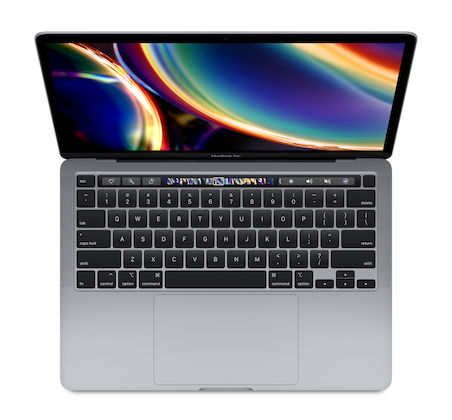
Its popular Magic Keyboard also enhanced its overall popularity and value thanks to its redesigned scissor mechanism that delivers 1mm of key travel as well as an Apple-designed rubber dome that stores more potential energy for a responsive key press.
Replacing the function keys in the top row of the keyboard, the Touch Bar features a Retina-quality display and supports multi-touch input. The power button contains the Touch ID sensor, so you can quickly log into your MacBook Pro using your fingerprint.
For improved storage capacity, it boasts a generous 512GB Solid State Drive (SSD). For the connectivity gurus, the Thunderbolt 3 ports support bi-directional transfer speeds of up to 40 GB/seconnd while also supporting 10 GB/second USB 3.1 and device charging.
MacBook Pro Mid-2020 Specifications:
- Processor: 10th Gen Intel Core i7 2.3GHz (4.1GHz Max Turbo) Quad-Core with 6MB L3 Cache
- Memory: 16GB 3733MHz LPDDR4X (32GB Max)
- Storage: 512GB Solid State Drive (SSD)
- Media Drive: None (Sold Separately)
- Display: 13.3" Retina (2560 x 1600) native resolution at 227 pixels per inch 500 nits with In-Plane Switching (IPS) Technology
- Graphics: Intel Iris Plus (Integrated)
- Video Support: Simultaneously supports full native resolution on the built-in display at millions of colors and:
- One external 6K display with 6016-by-3384 resolution at 60Hz at over a billion colors, or
- One external 5K display with 5120-by-2880 resolution at 60Hz at over a billion colors, or
- Up to two external 4K displays with 4096-by-2304 resolution at 60Hz at millions of colors
- Wireless: WiFi 5 + Bluetooth 5
- Wired: None (Sold Separately)
- Ports: 4 x Thunderbolt 3 with Support For:
- Charging
- DisplayPort
- Thunderbolt 3 (up to 40Gb/s)
- USB 3.1 Gen 2 (up to 10Gb/s)
- Additional Ports: 3.5 mm Headphone Jack
- Camera: 720p FaceTime HD
- Audio:
- Stereo speakers with high dynamic range
- Wide stereo sound
- Support for Dolby Atmos playback
- Three-mic array with directional beamforming
- Keyboard: Backlit Magic Keyboard with:
- 65 keys including 4 arrow keys in an inverted‑T arrangement
- Touch Bar
- Touch ID sensor
- Ambient light sensor
- Force Touch trackpad for precise cursor control and pressure-sensing capabilities; enables Force clicks, accelerators, pressure-sensitive drawing, and Multi-Touch gestures
- Finish: Gray
- Operating System: macOS Big Sur or Higher
- Warranty: 90 Days
Physical Specifications:
- Height: 0.61 inch (1.56 cm)
- Width: 11.97 inches (30.41 cm)
- Depth: 8.36 inches (21.24 cm)
- Weight: 3.1 pounds (1.4 kg)
Please Note: This renewed product has been professionally inspected and tested to work and look as new as possible.
BitDefender SecurePass Password Manager 1-Year Subscription for Mac/Windows/iOS/Android
Bitdefender SecurePass keeps your sensitive information completely secret and simplifies your digital life by memorising hundreds of passwords for you. Easily manage your logins with the help of a single master password.
Vault-like protection of passwords and sensitive data thanks to end-to-end encryption technology, the gold standard of the industry. When your data travels from your device to the server, it’s protected by not just one, but two secret codes, making sure it stays private.
Features include:
- Runs and Syncs on Multiple Platforms and Browsers: This multi-platform service comes as a browser extension for Windows and macOS that supports the following browsers: Chrome, Firefox, Safari and Edge. It provides mobile apps for Android and iOS.
- Imports Data Easily: Retrieve your passwords from a multitude of password managers and file formats: Bitdefender Password Manager, Bitdefender Wallet, Saferpass, 1password, Kaspersky Password Manager, Dashlane, Chrome browser, Firefox browser, Edge browser, Bitwarden, Lastpass, Keepass, Roboform.
- Simplifies the Management of Your Online Identities: (Only Available on Mobile Apps) Browse through online identities with ease and let our password manager autofill online forms with personal data for you. All data is encrypted locally and no third party has access to it.
- Credit Card Management: Securely save your credit card details, encrypted locally and accessible only with your Master Password.
- Secure Password Sharing: Share passwords with family or team members securely, ensuring access without compromising security.
Password Handling Attributes include:
- Password Generator: Generate a secure, complex, and unique password for every new account, in a single click. Forget about reusing passwords. Forget the hassle of creating new, strong passwords. Forget about having to remember them
- Automatically Change Passwords: Let BitDefender take care of your online safety habits. They will prompt you to store your passwords immediately after creating them. Moreover, the passwords will be kept in the ultra-safe environment provided for you. Feature available on browser extensions.
- Intelligent Password Autofill: On a website you’ve already visited? Let this password manager autofill user sign-in information and passwords. Their algorithms can prefill credentials on visited websites, saving you precious time.
- Password Quality Check: On the internet you are as safe as your most vulnerable password. Don’t let the bad guys take over your accounts! This feature will let you know if a password requires your immediate attention.
- Search Password Duplicates: The truth is many of us reuse passwords. A single attack could leave you exposed on multiple fronts. No need for password recycling as you now use a tool that puts Password Generator at your disposal – the one-click feature that generates long, complex passwords for every account.
- Multiplatform Password Synchronizations: This solution supports a multitude of web browsers (Chrome, Safari, Firefox and Edge). Once saved, you can access your passwords from a PC, a Mac, or a mobile device running Android with the help of a single Master Password.
- Password Warnings and Hint Sections: Useful info at the tips of your fingers! BitDefender's security report displays information about your password hygiene: duplicate, weak, or leaked passwords. This way you know when it’s time to act.
- Auto Lock Setup: Did you forget to sign out after using a device that is not yours?! This feature will lock the password manager with a PIN or log you out after a period of inactivity at browser level.
- Account Recovery: Locked out of Password Manager? The Recovery Key enables you to effortlessly retrieve your Master Password and regain access.
Other Attributes include:
- Password Leak Alert: Has your data been leaked? Check the state of your passwords anytime - individually or all at once. If your credentials have been exposed, it’s time to change your password!
- Identities Management: Store multiple identities and let our password manager automatically fill in your details in web forms before making a purchase. Quick, easy and secure! All identities are encrypted locally on the user’s computer or mobile phone so no one but you has access to this sensitive data. Feature available only on mobile apps.
- Credit Card Management: Save credit card details to enjoy a smooth online shopping experience. Protect your card details from prying eyes so your funds remain yours. Your data will be encrypted locally, and you will the only person with access to it via Master Password.
- Secure Notes: Secure notes acts just like a secret notebook where you can store sensitive data. Not only does it keep information tidy, but you also keep it safe and secure.
System Requirements:
Windows:
- Microsoft Edge: (based on Chromium 109 and later) on Windows 7 and later
- Mozilla Firefox: version 65 on Windows 7 and later
- Google Chrome: version 109 on Windows 7 and later
Mac:
- Microsoft Edge: (based on Chromium 109 and later) on macOS 10.14 (Mojave) and later
- Mozilla Firefox: version 65 on macOS 10.14 (Mojave) and later
- Google Chrome: version 109 on macOS 10.14 (Mojave) and later
- Safari*: version 12 on macOS 10.14 (Mojave) and later
- * System performance may be affected on devices that have old generation CPUs
iOS:
- iOS 15.0 or later
Android:
- Android 9.0 or later (Fingerprint unlock feature is supported from 6.0 and later.
- Autofill feature is supported from 8.0 and later)
Please Note: License Purchase is Valid for 1 Account for One Year


%2013.3%22%20Retina%20Display%20Intel%20Core%20i7%2016GB%20RAM%20512GB%20SSD%20with%20FREE!%20Password%20Manager)